

Image caption utility automates LoRA training file pairing
A Python utility from GitHub user a7in pairs Stable Diffusion metadata with caption files, adding batch rename, Google Translate, and LLM caption generation for LoRA training workflows.
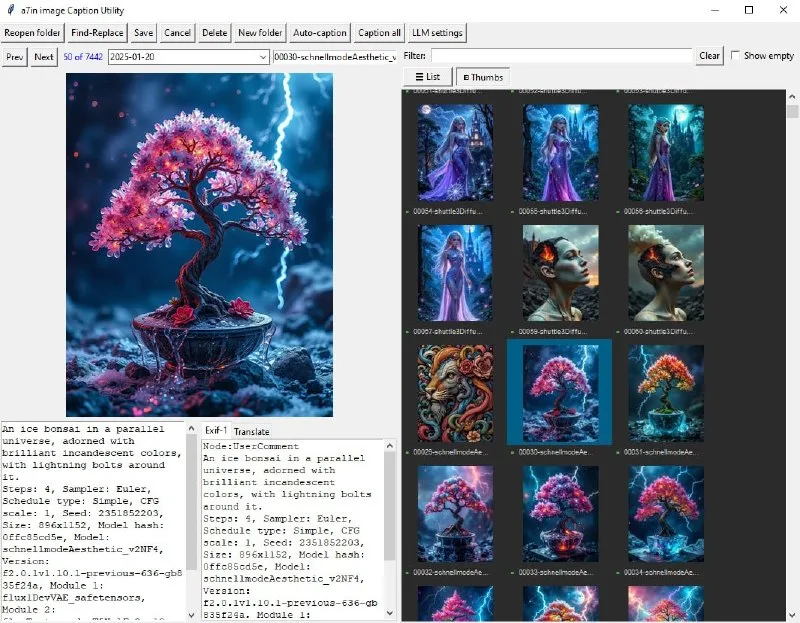
An open-source image manager now handles the busywork of keeping Stable Diffusion prompts in sync with caption files for LoRA training. The tool, published on GitHub as image_caption_utility by a7in, reads EXIF-embedded prompts from generated images and writes them to.txt sidecars that stay paired through rename, move, and delete operations. It also translates Russian prompts via Google Translate and can call an LLM to generate captions from scratch.
The utility targets a specific pain point in local fine-tuning: manually maintaining pairs of image and text files when organizing training sets. Every LoRA training run expects a folder of images with matching.txt files containing captions or tags. When you generate a few hundred images, cull the bad ones, rename keepers, and shuffle folders, keeping those text files aligned becomes tedious. The new tool automates that housekeeping—move an image and its caption moves with it, rename one and both get the new name, delete one and both disappear. The interface displays EXIF metadata alongside editable captions, letting you review what prompt actually generated each image before committing it to a training caption. The Google Translate integration matters for non-English workflows; Russian-language communities around Stable Diffusion and Pony models often generate with Cyrillic prompts, then need English captions for training. The LLM caption feature can generate descriptions from the image itself when EXIF data is missing or when you want a natural-language description instead of a raw prompt string. The code is available at github.com/a7in/image_caption_utility and requires Python and a local LLM endpoint for caption generation.


